How Much Does a Website Development Cost in 2026 

Home

How Much Does a Website Development Cost in 2026 

How Much Does a Website Development Cost in 2026 

Join our Newsletter!

Website Development Cost

It may sound easy to create a site in 2026, yet one must be very careful with planning. The web development cost is a topic that can cause a real debate between business owners and project teams. People desire to make a good investment. Although a budget is significant, the ultimate outcomes must be considered first. The overall cost is dependent on the design, features, and future needs. Having experience in a tech-expert company, we observe that people tend to stop at this point and reconsider themselves. Such a break enables them to become wiser with digital decisions.

In fact, knowing the cost is not just a matter of money. It is a matter of aligning your idea with the appropriate solution. Companies nowadays require speedy websites that can develop without any problems and remain safe. The prices are being influenced by these demands gradually. However, the latter still goes on changing because of new tools and trends. This puts cost planning at a higher level than before. So, in this blog, we explain what shapes website development prices in 2026 and how to plan them clearly.

Want a website that works effectively for your business without exceeding your budget? Mindpath’s web development services create tailored solutions that are reliable, scalable, and affordable.

Why Cost Matters While Creating a Website?

Cost planning determines the degree of strength of your website, and it influences all decisions. Website development cost directly dictates the quality of design, functionality, security, and user experience, and ultimately your site’s conversion rate. An effective budget allows one to employ talented professionals and prevent poor growth. It also helps avoid hidden fees and expensive redesigns caused by poor performance or technical downtime. Webpage development cost also includes hosting, tools, and testing. A combination of these components forms a site that can support business objectives and generate long-term value.

The site also requires routine maintenance to continue to be useful after launching. Web development service costs involve updates, security checks, and performance improvements. These measures make the site stable and reliable. A preplanned budget also regulates the alterations in features and averts unnecessary costs. You can monitor the leads and sales with proper cost planning. This enables the site to be a powerful, quantifiable business resource.

Want to avoid unexpected website development costs? Check out the web development roadmap to understand project milestones and cost drivers.

Factors Influencing Website Development Costs in 2026

Website expenses in 2026 are based on a combination of various intertwined aspects that will inform the course of planning decisions. Webpage development and website design cost makes businesses understand how to establish a realistic budget early.
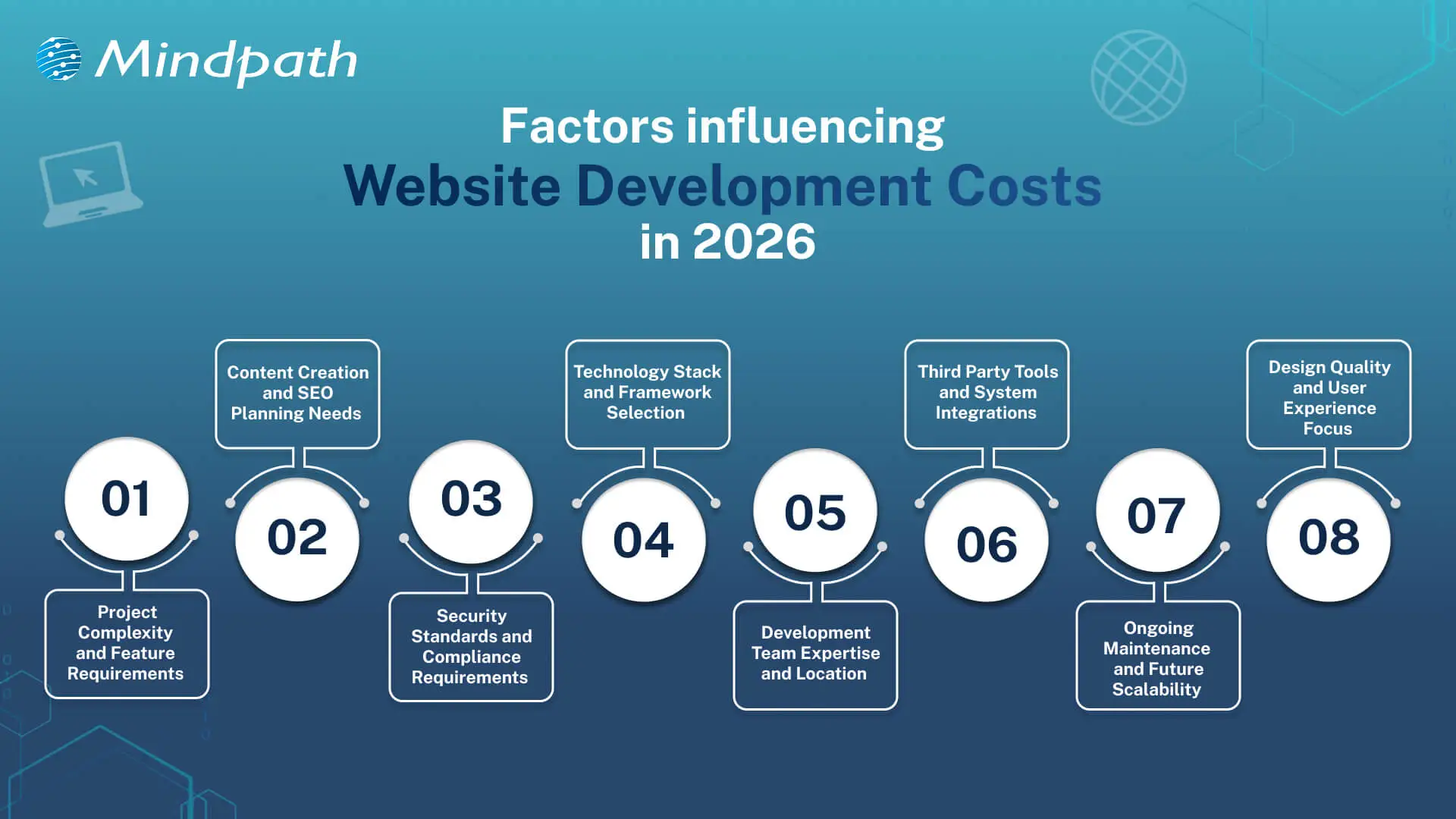
Factors Influencing Website Development Costs in 2026

1. Project Complexity

Basic websites are inexpensive and will satisfy fundamental requirements. The inclusion of more specific features like e-commerce or user accounts complicates and adds more planning. All these additions increase the average website development costs.

2. Content and SEO Requirements

Excellent content is advantageous to the user and the search engines. Establishing the SEO takes serious planning and technical effort. This increases visibility but increases the budget.

3. Security and Compliance Needs

Secure websites save the data of users and maintain the reputations of the business. Compliance regulations impose additional development phases, which introduce relevant layers of costs.

4. Technology Stack Choices

The contemporary tools determine the strength of a web site. It is time-consuming to work with AI, AR, and sophisticated frameworks. This option has a powerful influence on the website development costs.

Curious why some web projects cost more than others? Discover web development tools and see how technology choices influence productivity and expenses.

5. Development Team and Location

Expert teams provide scalable and stable websites. Compared to freelancers, agencies are more expensive due to their wider knowledge. Location is also a factor that affects rates and total expenditure.

6. Third Party Integrations

Websites usually have a connection with payment or CRM tools. Additional setup and testing time is added in every connection. An increase in integrations implies increased development effort.

7. Maintenance and Scalability

Websites need updates after launch. Hosting, fixes, and growth planning require steady investment. These costs support long-term performance and ROI.

8. Design and User Experience

Good design improves trust and user flow. Custom layouts need research and testing across devices. This work increases value and raises the average website development cost.

Looking to understand how emerging trends affect website development costs? Check out the latest web development trends to see how new technologies and practices influence project scope.

Understanding Website Development Costs

Website development costs depend on planning, technology, and business goals working together. Understanding these costs helps businesses make smart decisions before starting development.

1. Enterprise Website

The cost usually starts from £50,000 and can exceed £150,000 based on scale. Pricing increases due to security, integrations, and multi-language requirements.

2. Single-Page Website

Costs typically range between £250 and £800 for a basic setup. The price stays low because development time and features remain minimal.

3. Custom Web Platform

These platforms cost between £15,000 and £75,000 or more depending on logic. Higher costs reflect custom development, testing, and long build cycles.

Curious how web development costs compare to full-scale software projects? Discover software development cost insights to understand long-term budgeting and investment planning.

4. Small Business Website

The average cost falls between £800 and £3,000 for 5 to 10 pages. Pricing depends on CMS use, design level, and basic SEO setup.

5. E-Commerce Website

Costs usually start around £2,500 and can exceed £20,000. The final price depends on products, payment systems, and inventory complexity.

6. Advanced Brochure Website

Pricing ranges from £3,000 to £8,000 for custom design builds. Costs rise due to animations, performance hosting, and lead-focused features.

Planning your web development budget more effectively? Explore web development technologies to see how choosing the right stack affects cost and performance.

Ready to Plan Your Website Budget with Confidence?

Planning a website in 2026 needs clarity and smart thinking. Costs connect with design, features, security, and growth plans. Website development costs change with every decision you make. Clear planning avoids confusion later. It also helps balance value and spending. When you understand web development pricing, you invest with purpose and confidence.

Mindpath web development services focus on clarity, quality, and growth. Our teams plan projects with clear goals and transparent charges for website development. We build secure, scalable websites that support real business needs. Every solution balances performance and cost. With Mindpath, planning stays simple and results stay strong.

Related Post

AI and Cloud Computing

The modern-day digital development depends on the intelligence, scalability, and flexibility advancing concurrently. This transformation is driven by AI and cloud computing, which help companies to make more efficient decisions by analyzing data faster. Executives see visible improvements in operations, products and customer experience. Consequently, the subject of conversation is not just trends but actually implementation. Teams want to have systems that learn, adapt and spur growth with minimum friction or delays.

With the increased adoption, there are heightened expectations in every industry. Decision makers want to have clarity, control and enduring value. They have to strike a balance between innovation and stability and cost consciousness. Additionally, it depends on choosing the correct strategy at the initial stage to succeed. Strategy is crucial and so is the technology. So, in this blog, we shall analyze the major advantages and the best practices of AI and cloud computing.

Keep reading further to learn more about this strategic synergy!

Want to optimize your business operations and scale effortlessly with the cloud? Mindpath offers cloud-managed services to provide secure, efficient, and fully managed cloud solutions.

Understanding the Core Fundamentals of AI and Cloud Computing

Artificial Intelligence (AI) facilitates machines to carry out tasks that would otherwise be carried out by human intelligence. It studies based on data, reasoning, identifies patterns, and comprehends language. Some of these major fields are machine learning, deep learning and natural language processing. AI helps companies to increase their efficiency, create smarter tools, and discover insights. Artificial intelligence and cloud computing tend to collaborate in order to improve outcomes.

Cloud computing involves computing resources, which include servers, storage as well as software offered via the Internet. It allows businesses to scale fast, pay as per their usage and access services anytime. The basic models include IaaS, PaaS and SaaS. This adaptability reduces the cost, accelerates the development, and supports the contemporary applications.

AI applications run effectively and successfully on cloud computing. AI and cloud computing go hand in hand to develop smarter and quicker systems. Cloud provides scalable storage and high-performance computing of AI models. AI will introduce intelligent cloud services via analytics, automation and optimization of resources. They all facilitate chatbots, predictive insights, and data analysis. The companies can operate cloud-based AI to take advantage of more advanced AI tools without substantial initial expenses and data analysis. Companies can access advanced AI tools on cloud platforms without huge upfront costs.

Looking to streamline cloud operations with intelligent solutions? Explore AI tools for DevOpss to see how automation and analytics optimize development and deployment workflows.

Key Benefits of AI Cloud Computing

AI and cloud computing are transforming the world of business and technologies. They open up fresh opportunities of development, productivity, and better decision making. Organizations look into how to make use of this combination. These are the best advantages that companies can embrace to remain competitive.

key benefits of AI Cloud Computing

1. Faster Data Insights

AI and cloud computing have excellent assistance in analyzing large data sets within a short period of time. Businesses bridge the data sources at ease and identify patterns that can make better decisions. This pace facilitates planning and minimizes guesswork in the operations.

2. Smarter Cost Control

AI and cloud computing minimize excessive expenditure on computers and their support. Businesses purchase resources as they consume and spend as demand increases. This strategy maintains flexible and predictable budgets.

3. Intelligent Automation

AI and cloud is used to automate repetitive workflow processes. Systems acquire knowledge and enhance processes through time. Teams are more strategic oriented as operations proceed normally.

4. Flexible Scaling Power

With AI and cloud computing, scaling up and down of resources is done on demand. Businesses either expand or contract without hesitation. This scalability helps in the development and unexpected increase in workload.

Must Read: Cloud Computing Trends

5. Easy Access to AI Tools

Cloud services provide ready-to-use AI services to business needs. Teams combine analytics, language processing, and vision tools within a short period of time. In combination, cloud computing and artificial intelligence eliminate technical restrictions.

6. Stronger Security Oversight

Cloud systems that operate based on AI keep a constant watch on activity. They identify threats at an early stage and react quicker to threats. This enhances security without retarding processes.

7. Better Data Management

Cloud services are an easy way of organizing, storing and retrieving data. AI assists in the automation of information classification and management. Companies have smarter data to analyze and report.

8. High Performance Computing

Artificial intelligence workloads require resources with high computing capabilities to operate. The cloud platforms offer on-demand GPUs and fast processors. Businesses deal with complicated activities that are not heavily capitalized.

Planning to deploy AI solutions at scale in the cloud? Explore cloud security tools to see how modern technologies secure AI pipelines and cloud infrastructure.

Best Practices for Implementing AI in Cloud Computing

AI and cloud computing need a more explicit and deliberate way of developing real value. Before adopting systems, teams need to plan, set goals and prepare systems. Technology is as important as strategy. These best practices demonstrate the way to apply AI in cloud computing in an effective and responsible manner.

Best Practices for Implementing AI in Cloud Computing

1. Select a Trusted Cloud Provider

Select a provider with the track record of working with AI and cloud services. Assess its standards of reliability, scalability, and compliance. Powerful partner will facilitate safe expansion and stable long-term operations.

2. Prioritize Data Privacy and Security

Encrypt and implement control access to sensitive information. Review security policies on a regular basis in order to minimize risks. High level of security instills trust in cloud systems and AI.

3. Define Clear AI Capabilities and Limits

Know what AI is capable of providing under the circumstances of the quality of the data. Track models regularly in order to identify bias or performance problems. Good expectations can make teams use AI in a responsible and effective way.

Also Read: Cloud Computing Attacks

4. Establish Ethical AI Practices

Instruct employees on how to use AI fairly, transparently, and accountably. Ethical consciousness results in an improved decision-making process within teams. Conscientious operations enhance the confidence of cloud-based AI.

5. Monitor Performance and Business Impact

Monitor behavior and business performance of the track systems. Assess value through measurement of efficiency, accuracy and cost. Consistent reviews help to maintain AI and cloud investments in accordance with the objectives.

6. Prepare for Future Innovation

Anticipate changing regulations and elements of technology. Architecture Software Build scalable systems, which welcome upgrades and additional features. A visionary roadmap would guarantee success in the long term with AI and cloud computing.

Wondering how AI applications can scale efficiently in the cloud? Check out serverless architecture in cloud computing to learn how server-free designs enable faster, cost-effective, and scalable deployments.

Ready to Turn AI and Cloud Computing into Real Business Value?

Artificial intelligence and cloud computing are transforming the nature of modern business development, competition, and innovation. They allow making smarter decisions, executing them faster, and operating flexibly together. It takes proper planning, excellent data, and responsible usage in order to be successful. By linking technology to the objectives of the firms, companies mitigate risk and create value in the long term. The approach will assist teams to develop systems which are adaptable, scalable and perform well.

Mindpath AI cloud services assist companies to embrace AI clearly and confidently. Our professionals develop safe and scalable solutions which are practical to the business requirements. We put an emphasis on performance, ethics, and quantifiable results. Mindpath provides organizations with a dependable service in terms of planning, deployment, and optimization. Our strategy will make AI and cloud computing produce useful outcomes and not complications.

augmented staff onboarding

Businesses are in constant need of scaling their IT workforce in the current scenario. This is why many organizations have turned to staff augmentation. It is a viable approach to bring in the external IT experts to work along with your internal teams. As per recent ISACA studies, around 75% of employees are prioritizing hybrid work environments. This has made IT staff augmentation even more powerful.

However, simply hiring augmented professionals is not enough. Without a structured approach, even the most talented developers might struggle to integrate properly with your workflow. In this guide, we will go through some practical steps for staff augmentation onboarding. This can help you successfully adopt remote or hybrid teams while maintaining precise collaboration.

Need a cost-effective way to scale your team with qualified IT talent on demand? At Mindpath, we offer flexible staff augmentation services to help businesses hire top-tier developers and specialists without long-term commitments.

What is Augmented Staff Onboarding and How It Can Upgrade Your Operations?

IT staff augmentation is all about hiring experts temporarily from a third-party organization. Further, the extended team will help your business grow while accelerating the project workflow. They will work under your management while filling the skill gaps.

With proper augmented staff onboarding, you can easily tackle the risks and expenses related to traditional hiring models. A company leveraging these services will match you with all the resources you require for a limited timeframe. Here are the benefits that make staff augmentation an attractive prospect.

1. Minimal Cost

If we compare it to full-scale hiring, augmented staff is a much more budget-friendly solution. Your vendor will cover their recruitment charges and benefits. However, the pricing structure completely depends on the region or the offshore companies you are selecting.

2. Outstanding Productivity

Unlike freelancers or outsourced teams, integrating augmented teams can be managed in real time. You can collaborate with them and encourage your productivity.

3. Global Pool of Talent

With IT staff augmentation, you are breaking the limits of the local talent pool. Further, casting a wider net offers you a better chance of finding skills that exactly match your business objectives.

For your knowledge, an effective onboarding process can upgrade your business productivity by 70%. Organizations with a streamlined onboarding process can boost new hire retention by 82%.

Want to stay ahead of evolving workforce strategies and technology demands? Discover the latest staff augmentation trends that are transforming how businesses scale teams and adopt hybrid work models.

A Detailed Step-by-Step IT Staff Onboarding Process

Integrating augmented professionals into your team needs more than an orientation meeting. So, here is a structured approach to ensure seamless integration of augmented teams into your existing workforce.

1. Define the Roles and Project Expectations

Before the augmented team starts working on your project, you should clearly define your expectations. Moreover, you need to be precise about your project goals and milestones. Make the experts know their individual responsibilities and reporting structure.

Clear expectations can eliminate any type of confusion while allowing your team members to start contributing faster. In the recent scenario, average tech skills are becoming outdated. So, identify their gaps and bring in experts who can make an immediate impact.

2. Prepare the Technical Environment

One of the biggest onboarding delays happens when new employees wait to access new tools and systems. So, before your staff augmentation onboarding, make sure they have access to development environments and other collaboration tools. They should also be aware of your security credentials and permissions.

Offering access to project management tools and collaboration platforms ensures everyone can trace the task and can update the feedback in real time. The new team should be responsible enough to immediately begin exploring the system architecture and your project structure.

3. Conduct a Structured Orientation Session

Orientation can be tagged as the first official step in the remote team onboarding. So, this session should introduce augmented staff to the company’s mission and culture.

You should be vocal about your company’s goals and values. Further, you can discuss the overview of your products or services. Give an introduction to key stakeholders and be sure about the project timelines.

You can also schedule a one-on-one session with the managers or team leads to explain the expectations. This approach will ensure augmented professionals completely understand the bigger picture.

Planning to streamline your recruitment process and onboard experts faster? Check out how staff augmentation hiring enables businesses to quickly integrate skilled professionals into their teams.

4. Introduce Augmented Staff to Your Internal Team

A major challenge in staff augmentation is generating a sense of belonging. So, if your external professionals are not feeling connected enough, the overall collaboration can suffer.

You can introduce your team members through virtual team meetings. Further, you can make informal introductions with your major stakeholders. This is one of the major steps in staff augmentation onboarding as it encourages collaboration.

5. Assign a Mentor or Guide

Assigning a mentor can speed up the learning process. The mentor can help the new members understand the internal workflows. Further, they can answer queries regarding the tools or other internal systems.

A dedicated point of contact can minimize communication gaps, and the augmented staff will also understand who to approach when they find something challenging. This approach can encourage productivity while strengthening collaboration between the internal and external teams.

A professional point of contact can easily fill in the communication gaps, and the external staff will also understand who to contact when they face any issues. This step can upgrade your productivity while strengthening the collaboration efforts.

6. Regarding a Clear Communication Channel

Communication is the backbone of successful staff augmentation onboarding. So, when your team works across multiple regions or time zones, clear communication becomes essential.

To ensure clear communication, define your communication protocols and response expectations. Conduct a meeting and use an individual collaboration platform to assess the doubts of your team. Your organization should also welcome queries and concerns of the augmented staff. In this way, professionals will feel comfortable sharing their innovations or ideas.

Want to optimize your team collaboration while keeping operational costs under control? Discover how cost effective IT staff augmentation helps businesses maintain efficiency and productivity without increasing hiring expenses.

7. Provide Training and Resources

Even experienced professionals or IT specialists need time to understand a company’s internal systems. So, your stretched team should have proper access to your documentation process.

Continuous training and workshops can upgrade the knowledge while making your team understand the overall project environment.

8. Verify Performance and Progress

Your onboarding process shouldn’t be for the first weeks. You should acknowledge continuous feedback to make your external staff know your project needs. Your managers should also check the performance of your team every week. Assess their work and give them reviews for better work processing.

These sessions can help you identify early opportunities to improve collaboration and overall productivity.

9. Follow up on the Onboarding Process

Your business should assess the importance of the onboarding process. Most importantly, consider the concerns and feedback of your internal team. Companies that refine their onboarding strategies over time can scale their augmented teams more effectively while increasing productivity.

Wondering which workforce model best fits your business needs and long-term goals? Learn the key differences between staff augmentation vs managed services to make a more informed decision.

Conclusion

If your business needs quick and scalable IT talent, staff augmentation can be an ideal solution. However, your IT staff onboarding process should be streamlined enough. It can simplify the process while making your augmented teams match the existing workflows.

Companies like Mindpath can help your business upgrade its IT capabilities. Our expert team leverages efficient strategies and streamlined staff augmentation. Our approaches have already been beneficial for many industry leaders. We can be your perfect match for fulfilling the digital transformation your company demands.

Discover best practices for onboarding augmented IT staff, from identifying team needs to seamless integration, ensuring success.

Support Is One Click Away

Featured Posts

Related Post

Explore how is AI transforming future, impacting data privacy, job markets, and business automation. Learn about Mindpath’s AI Services.